Thursday, June 4, 2015

How to Fix? Windows could not start... Hardware configuration problem...

Windows could not start because of a computer disk hardware configuration problem.

Could not read from the selected boot disk. Check boot path and disk hardware.

Please check the Windows documentation about hardware disk configuration and your hardware reference manuals for additional information.

How to Fix?

Requirement : Bootable OS in DVD/USB (Here im using as Win 7 is my Operating System)

1. Change your Boot Setting into USB/DVD as a First boot device.
2. "Install windows" screen will appear.
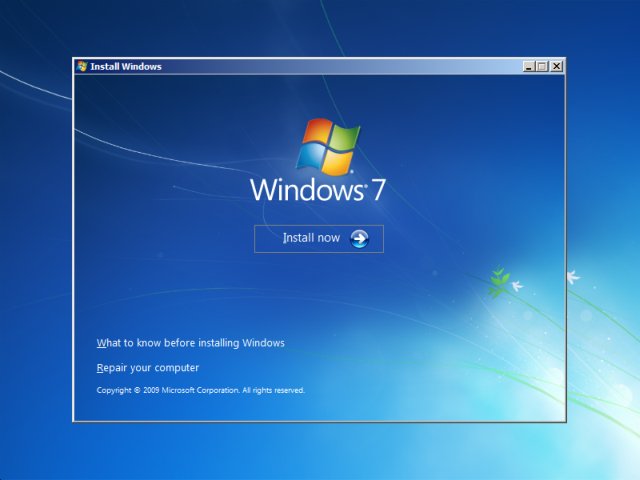
How To Install Windows 7
3. Choose "repair your computer" option in the left corner down.
4. System Recovery Options screen appears
5. Click Start up Repair.
6. Done .. Remove the USB/DVD and change the boot settings.
 

Monday, December 31, 2012

How to Remove Internet Explorer Content Advisor Password?

Remove the Internet Explorer Content Advisor Password from its Registry.

1. Click Start Button and type Run command / Use the Shortcut  Windows + r .
2. Enter Regedit into the run text box.
3. Navigate to  HKEY_LOCAL_MACHINE\SOFTWARE\Microsoft\Windows\CurrentVersion
\Policies\Ratings
4. In the right side pane, Right click the Key and Delete it.
5.  Now you can access the IE without any trouble.

Sunday, December 30, 2012

How to Block Website On Your PC?


1. Click Start Button, and type Notepad and then Right click on the notepad and select Run as Administrator Options. [If you are not open your notepad with admin rights, it might be problem when saving your notepad]
2. Go to File Menu and Click Open and navigate to C:\Windows\System32\drivers\etc. If Windows is not installed on C:, substitute the appropriate drive letter.
3. Click and Open hosts file.
3. Place the cursor at the end of the last line, which will say something such as '127.0.0.1 localhost' or '::1 localhost'. Press Enter to create a new line.

4. Type 127.0.0.1, tab the spacebar once, and then type the address of a website you want to block. For example, to block all traffic from Facebook, type 127.0.0.1 www.facebook.com on this line.
5. Continue to add the websites you wish to block, each prefaced with 127.0.0.1 and a space.
6. Click File, Save to commit to your changes.
7. Close any open browser windows, and then reopen a browser to test your edits. The blocked sites should not display in any browser.
*****

Offshore Medicals is the medical assessment booking platform. We facilitate the medical assessments that are required by the offshore industry to ensure an individual’s fitness to work within a specialist environment. To know more about our services, pls visit our site.